Friday, October 23, 2009

How to identify menus and commands with Visual Studio?

Sometimes when we extend the Visual Studio it's very important to know what IDs the menu or command has. Ed Dore published great post Using EnableVSIPLogging to identify menus and commands with VS 2005 + SP1, which describes how to enable VSIP (the old abbreviation of VSX) logging.

To do that all you need is to add(or change) the setting in Windows Registry that informs IDE to enable logging. That is the registry file content for Visual Studio 2005 SP1 or above:

Windows Registry Editor Version 5.00
[HKEY_CURRENT_USER\Software\Microsoft\VisualStudio\8.0\General]
"EnableVSIPLogging"=dword:00000001

Similar registry file will work for Visual Studio 2008 as well:

Windows Registry Editor Version 5.00
[HKEY_CURRENT_USER\Software\Microsoft\VisualStudio\9.0\General]
"EnableVSIPLogging"=dword:00000001

Once "EnableVSIPLogging" setting is set to 1, you can click on menu or command with CTRL+SHIFT pressed to see the information about clicked item in message box like this:

VSDebug Message box for Format Document toolbar button

Look to Ed Dore's post for more details.

Keep in touch and happy extending!

Read more...

Tuesday, October 20, 2009

Beta Visual Studio 2010 and .NET Framework 4 released!

On 21 October developers can try new possibilities provided by Visual Studio 2010 Beta 1 and .NET Framework 4.0!

The most important things:

  • Top testing possibilities
  • IDE improvements
  • New drag-and-drop data binding mechanism for Silverlight and WPF
  • Development tools for Windows 7, SharePoint and other technologies
  • New integration possibilities with such technologies as: ASP.NET MVC, UML, Expression, multi-core and database

Read more about and download new Visual Studio 2010 Beta 1 here: http://www.microsoft.com/visualstudio/en-us/products/2010/default.mspx

Keep in touch and happy extending!

Read more...

Tuesday, August 4, 2009

Visual Studio 2010 SDK Beta 1 released

Visual Studio 2010 SDK Beta 1 is now available for download here. Read more...

Tuesday, July 7, 2009

I have received the 2009 Microsoft MVP Award!

I have received the 2009 Microsoft MVP Award for this year as well. I've been awarded in 2008 and now I'm still Microsoft MVP. Cool! :) Read more...

Sunday, May 24, 2009

Create innovative extensions for Visual Studio 2010!

I have received the cool information about the Visual Studio 2010 Beta 1 extensibility. So I have just decided to quote it in my blog as is: “Are you building new tools to simplify your life or change the way people work? Check out the opportunities to create innovative extensions for Visual Studio 2010…


Examples of cool things you can do:


  • Overlay rich metadata on top of the editor to bring new information to your fingertips

  • Develop new project templates to accelerate your work (examples: New Project Dialog)

  • Create innovative user interface elements using the WPF Shell

  • Upload your extension to the Visual Studio Gallery to find it in the Extension Manager


Other things you should know:


  • With v2 of the Visual Studio Gallery that went live on 5/14, you can use the Extension Manager to find products from the ecosystem from within Visual Studio
    (with Beta1, the Extension Manager will only surface extensions posted to the Gallery in the VSIX file format; Beta2 will include the MSI format)

  • We just released the new SDK along with the new Shell redistributables, look for them at the dev center: http://msdn.com/vsx
  • If you’re developing extensions for VS 2010, you’ll want to stay tuned to the dev center for more information


Fun things to help you get started – these can be found in the Extension Manager (Tools>Extension Manager): search for Editor Extensions


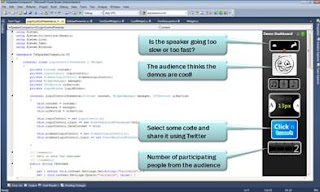
DemoDashboard Sample:


The DemoDashboard sample is a WPF “dashboard” designed for folks presenting demos in VS2010 to get real-time audience feedback via Twitter. Use this sample to give presentations, build your own widgets, etc. The wiki on the CodePlex site will give you all the info you need to get started. You can share the feedback you get with your followers on Twitter.


get it: Tools>Extension Manager


or from the Gallery: here


source: http://demodashboard.codeplex.com


screenshot:


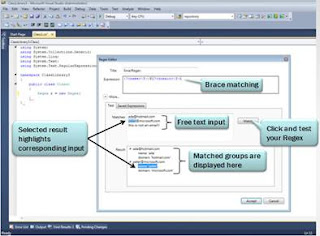
RegEx Editor Sample:


This sample was built to ease the your pain when working with regular expressions. It shows re-hosting of the editor in a window and provides a nice starting point for similar projects.


get it: Tools>Extension Manager


or from the Gallery: here


source: http://editorsamples.codeplex.com


screenshot:


Custom Intellisense Sample:


This sample provides a custom WPF-based UI for Intellisense -- with databinding and other cool features. You might want to use it as-is, you might want to personalize it, you might want to build new features for it – the choice is yours.


get it: Tools>Extension Manager


or from the Gallery: here


source: http://editorsamples.codeplex.com


screenshot:
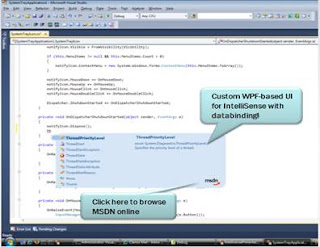


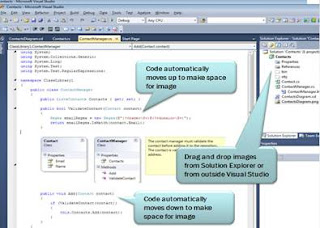
Image Insertion Sample:


This sample is all about visualizing resources inline, it provides some nice transparency effects when you’re dragging an image from the solution explorer, and will automatically resize text to fit the image.


get it: Tools>Extension Manager


or from the Gallery: here


source: http://editorsamples.codeplex.com


screenshot:


FAQ:


1. What is the Extension Manager and how do I find it?


The Extension Manager in Visual Studio enables developers to discover Visual Studio Extensions from within the product itself. It consumes data directly from the Visual Studio Gallery, giving developers direct access to partner and community products that extend and enhance Visual Studio. If you have a free or free trial version of your product hosted on the Visual Studio Gallery, a developer will be able to download and install that product directly from within the IDE. (In Beta1, the in-product experience will show only extensions uploaded as a VSIX. In Beta 2 we will expand the in-product experience to also include extensions uploaded as MSI and reference links to other download sites.)


The Extension Manager enables a developer to install, upgrade, uninstall, enable, and disable extensions, making it easier to manage a portfolio of extensions.


To find the Extension Manager: Tools>Extension Manager.


2. So this means the Visual Studio Gallery can now host downloads?


Yes, we’re excited to announce that the Visual Studio Gallery can now host your downloads. Keep in mind that at this time the gallery does not include a commerce framework so we recommend creating a free or free trial version of your product that can be hosted on the Visual Studio Gallery. Of course we still support reference links for users who prefer to host their own downloads.


3. What else is new @ the Visual Studio Gallery?


Thanks to some great work by the MSDN team we’ve moved the Visual Studio Gallery to be part of MSDN. Some of the benefits:


  • The new navigation model supports all types of Visual Studio Extensions and has sections for Tools, Controls, and Templates

  • The integration with MSDN now gives users a chance to take advantage of a shared profile across all MSDN properties. Contributing to the gallery can enhance your MSDN reputation giving high quality contributors the recognition they deserve.

  • Visual Studio Gallery contributions offer an optional discussion board to separate your reviews and give contributors an opportunity to post updates, respond to feedback, & discuss bugs.

  • All entries include a usage chart to give contributors a sense of which of their products are getting the most traffic on the Visual Studio Gallery.


4. What’s the deal with the VSIX file format I’ve heard about?


Both the new Visual Studio Gallery and the Extension Manager work with .VSIX files, which is a new deployment model for extensions, similar to a renamed .ZIP file. This transition provides Visual Studio users a new low-overhead, reliable way to deploy Visual Studio Extensions. There’s tooling available to help you with this, and you can find instructions and other helpful tips at the Visual Studio Extensibility Dev Center: http://msdn.com/vsx.


Read more...

Visual Studio 2010 SDK available for download

A few days ago Visual Studio 2010 Beta 1 SDK becomes available for download. The Visual Studio 2010 SDK Beta 1 provides tools and templates for building Visual Studio extensions. By using the Visual Studio SDK, you can build your own tool windows, create menu commands, and add extensions to the new Visual Studio editor and other features.

You can download the Visual Studio 2010 Beta 1 SDK here.

Also check the Visual Studio 2010 SDK Beta 1 Readme to avoid possible problems with migration.

Keep in touch and happy extending!


Read more...

Visual Studio 2010 Beta 1 released!

Visual Studio 2010 Beta 1 has been released to the web. It has the new look and feel which relies heavily on WPF. There are a few screenshots available on Jason Zander's WebLog.


Visual Studio 2010 has some new interesting features like Extension Manager, and a lot of cool improvements in Code Editor. There are a few links pointing and describing new stuff in Visual Studio 2010:


You can download Visual Studio 2010 Beta 1 here.


Keep in touch and happy extending!


Read more...

Thursday, May 14, 2009

Snip your DSL into prototypes

In case you did not see it yet, have a look at the cool white paper Snip your dsl into prototypes posted on NetFxFactory.

It provides the intersting solution based on DSL Tools.

Source: http://www.netfxfactory.org/blogs/papers/archive/2008/06/25/snip-your-dsl-into-prototypes.aspx

Keep in touch and happy extending!

Read more...

Sunday, November 9, 2008

Visual Studio now in Russian!

Being Russian myself I glad to announce that from now Russian localization of Visual Studio is here.

There are links to download Russian Visual Studio trials and related staff, which I grabbed from Quan To's weblog :)

And these two links are stolen from VSX Team Blog: the Russian edition of Visual Studio has just been released which includes a Russian Integrated Shell and Russian Isolated Shell. Read more details on Quan To's Visual Studio Extensibility blog. And...

Да здравствует Студия!!! :)

Keep in touch and happy extending!

Read more...

Tuesday, October 28, 2008

Microsoft Visual Studio Tips book by Sara Ford released

This week new Microsoft Visual Studio Tips book written by Sara Ford has been released.


You might know that Sara posted a lot of valuable tips about working in Visual Studio at her blog. Sara’s tips can be found also found here in Russian translated by Vitaly Zaiko. And here in French, and in Spanish as well.


Read more details on Amazon website about Microsoft Visual Studio Tips book.


Keep in touch and happy extending!


Read more...

Sunday, October 5, 2008

Near future: Visual Studio 2010 и .NET Framework 4.0

About 10 months ago we got Visual Studio 2008 and .NET Framework 3.5. Very soon we'll got a new set - Visual Studio 2010 и .NET Framework 4.0!

Read more about next generation of developer tools from Microsoft on MSDN website here: Visual Studio 2010 and .NET Framework 4.0 Overview. There is also some words about that in Russian.

Keep in touch and happy extending!

Read more...

Sunday, September 7, 2008

Do you want to update you system? Install VS2008 SDK 1.1 RTM!

Before installing Visual Studio SDK 1.1 RTM I decided to install Visual Studio 2008 Service Pack 1 announced recently...

After some attempts to install the Visual Studio 2008 Service Pack 1, I figured out that I had to install Service Pack 3 for my Windows XP Professional first. I have also installed Service Pack 1 for .NET Framework 3.5 because Visual Studio SDK 1.1 RTM requires it.

Well my decision caused the 3 hours of installations and entire update for my machine :)

Keep in touch and happy extending!

Read more...

Thursday, August 21, 2008

Visual Studio 2008 SDK 1.1 is released!

Visual Studio 2008 SDK 1.1 has been released today and now it’s available for download!

A week ago VS Ecosystem team released a Service Pack 1 for the Visual Studio 2008 and today they completed another big deal – VSSDK 1.1. Developers who will be developing against Visual Studio Service Pack 1 now have updated tools, headers, and some new features in the SDK.

There are some notes about what is included to the 1.1 SDK release:

  • Significant size reduction for Visual Studio Shell redistributable packages. The Visual Studio Shell Isolated and Visual Studio Shell Integrated redistributables are now approximately 150 megabytes smaller. The redistributables no longer carry the full .NET Framework 3.5 payload. However, they contain a bootstrapper that automatically downloads the .NET Framework 3.5 runtime if it is not installed on the target computer.
  • Support for progress feedback in a chained installation. The Visual Studio Shell Isolated and Visual Studio Shell Integrated redistributables can now pass installation progress back to the chaining process. This lets developers display accurate progress in their setup programs.
  • Visual Studio Shell development now supports normal user. Developing and deploying a Visual Studio Shell application no longer requires the developer to be an administrator on a Windows XP computer or to have elevated privileges on a Windows Vista computer.
  • DSL Print Preview. The ability to preview a DSL before printing has been added to the DSL designer.
  • New XML Tree Editor sample. The SQL Server team has provided a new XML Tree Editor sample.  The earlier sample has been removed.
  • New TFS Samples. Two new TFS samples have been added.
    • VSExtensibilitySample. This new TFS sample provides an example of creating a Visual Studio add-in that interacts with the Version Control user interface of Team Explorer.  The sample comes with a detailed Word doc that provides insight into the requirements of such an add-in.
    • RichClientCustomControl. This new TFS sample provides an example of creating Work Item Tracking custom controls that work within Team Explorer.  The sample comes with a detailed Word doc that provides insight into the requirements of custom controls as well as a separate document that describes how to write custom controls that can be used within the Team Server Web Access environment .
  • Updated Shell documentation. Documentation about the Shell has been added.

The Visual Studio 2008 SDK 1.1 can be downloaded here.

Keep in touch and happy extending!

Read more...

Thursday, August 14, 2008

VS 2008 SDK 1.1 RTM is coming...

Good news! Yesterday Visual Studio Team released the Visual Studio 2008 Service Pack 1 as well as .NET Framework 3.5 Service Pack 1. Great! But even more cool is that the matching VS 2008 SDK 1.1 RTM will be coming next week!

Read more details and links related to these service packs:

MSDN: Visual Studio 2008 Development System - Visual Studio 2008 Service Pack 1 and .NET Framework 3.5 Service Pack 1

Somasegar's WebLog - Service Pack 1 for VS 2008 and .NET FX 3.5 released!

VSX Team Blog - Visual Studio 2008 SP1 Now Available

Keep in touch and happy extending!

Read more...

Saturday, August 2, 2008

Ed Dore's VSX samples from closed GotDotNet website

I hope Ed won't mind about the re-posting here in my blog his great VSX samples I've downloaded from currently closed GotDotNet website when it was alive. (Ed, in case you want me to remove them from here, just let me know).

So there are the following samples available:

HierAnarchy Sample Package (HierAnarchy.zip, 37k)
Sample MPF based Visual Studio Package written in CSharp. This sample demonstrates how to create a Solution/Server Explorer type toolwindow. It also implements a very minimalistic IVsUIHierarchy interface, and just enough properties to actually display a few nodes in the VsUIHierarchy's tree control.

MyErrors Sample Package (MyErrorsPackage.zip, 39k)
Sample Visual Studio Package written in C#; that illustrates using an ErrorListProvider to participate in the ErrorList ToolWindow. This package implements a toolwindow from which you can add ErrorTask objects to the ErrorList ToolWindow.

TBEdit Sample Package (TBEdit.zip, 37k)
Sample Visual Studio Package written in C#; that implements a custom editor based on a UserControl that supports several logical views via a tab control.

MPEdit Sample Package (MPEdit.zip, 43k)
Sample Visual Studio Package written in C#; that illustrates creating and hosting the Visual Studio Core Editor, VsCodeWindow as a child control, in a managed user control based editor.

CWTool Sample Package (CWTool.zip, 43k)
Sample Visual Studio Package written with C#; that illustrates two techniques for creating and hosting the Visual Studio Core Editor, VsCodeWindow as a child control, in a managed toolwindow.

AllowParams Sample Package (AllowParams.zip, 38k)
Sample Visual Studio package that illustrates how to leverage the ParametersDescription property on OleMenuCommand objects, in order to support the ALLOWPARAMS flag on commands defined in the package’s .CTC resource.

Find CommandBar Sample Package (FindCommandBar.zip, 58k)
My description: Sample Visual Studio package that illustrates how to retrieve a Visual Studio CommandBar using IVsProfferCommands.

DSRefViewer (DSRefViewer.zip, 29k)
My description: Actually, I don’t know what does the package illustrates. Just look at the code yourself! :)

Keep in touch and happy extending!

Read more...

Saturday, July 5, 2008

Visual Studio Gallery: new features added

A few days ago the Visual Studio Gallery has been significantly updated.These new features are focused on helping you be always up to date on the latest additions to the gallery as well as on making us available to add rich details information about our extensions.

There are following updates released: RSS feeds, Tags, new WSIWYG editor, zooming to 640х480 images, User Rating, Full Reviews and many other improvements. Read more details on Anthony's post and visit Visual Studio Gallery to try it yourself!

Keep in touch and happy extending!

Read more...

Wednesday, July 2, 2008

I have received the 2008 Microsoft MVP Award!

Yesterday I have received the 2008 Microsoft MVP Award. Very cool.

The award is for the contribution to VSX community. I was awarded in C# category because of there is no VSX category within the MVP program yet. Hope that will be here in future.

Keep in touch and happy extending!

Read more...

Saturday, June 7, 2008

Visual Studio Gallery updated!

A few months ago the Visual Studio Gallery has been announced as the one stop shop for Visual Studio Extensions. Hundreds of extensions have been added already for these several months. In case your add-in or package is still not submitted there - do that now to promote your extension absolutely for FREE!

Today Anthony Cangialosi announced a new set of needed features that will improve the appeal of the Visual studio Gallery. This update is related to possibility to rate extensions and provide a review for them. Also some improvements in searching.

Next time Anthony promised to add RSS feeds, which would be really great to see, because that will allow us to easily track all updates and new Visual Studio extensions appearing on the Gallery.

Keep in touch and happy extending!

Read more...

Thursday, June 5, 2008

VSX future - will it be MEF?

Today I have noticed an interesting post in Aaron Marten blog, which is talking about Managed Extensibility Framework or just MEF. There is also some words about MEF from Krzysztof Cwalina.

Aaron assumes that this frameworks will be used for Visual Studio Extensibility platform in the future. The first version of MEF CTP June 4 2008 has been released just two days ago. As it mentioned in MEF Introduction materials:

What is MEF?

The Managed Extensibility Framework or MEF provides developers with a tool to easily add extensibility to their applications and with minimal impact on existing code. The application developer can define extension points according to the functionality required of an extension, while the extension developer uses those points to interact with the application.

MEF enables this extensibility to take place without creating a hard dependency in either direction. Applications can be extended at run time without recompilation, and extensions can be used by multiple applications sharing the same extension requirements. MEF also allows an application to delay the loading of an extension while still examining its metadata, enabling efficient traversal of large catalogs of extensions...

Maybe the next version of Visual Studio IDE will be architected with MEF.Who knows?..

Keep in touch and happy extending!

Read more...

VSX Survey (Spring 2008)

Now a new VSX Survey is available to fill out. Please take a few minutes to fill out the VSX Survey (Spring 2008). These surveys are the way we can affect to VSX team priorities and work directions.

There are 6 web pages with 23 multiple choice and fill-in-the blank questions in this survey. This is the second VSX survey, as VSX team plans to offer a similar survey every 6 months and track the trends from the results.

Keep in touch and happy extending!

Read more...